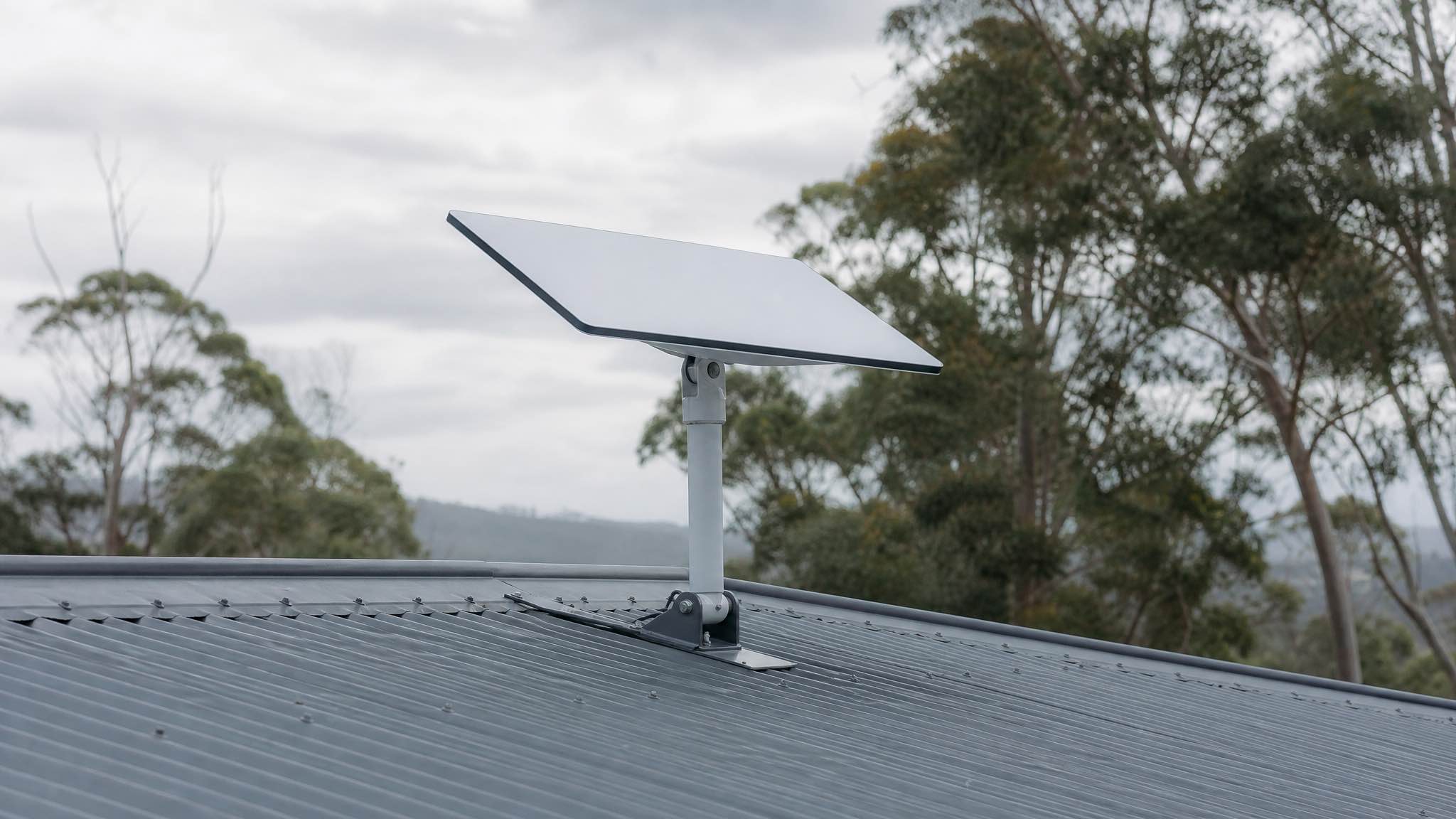
If you live past the end of the fibre, you already know the problem Starlink® was built for. Hundreds of small satellites in low Earth orbit, a flat panel antenna on your roof, and a network that hands your video call from one satellite to the next without you noticing. It works well enough for Zoom, Xero and a Netflix binge in places where 4G drops to a single bar by lunchtime.
This is the plain explainer. How the signal gets from your laptop to space and back, what changes your speed on any given day, who else is racing to build a constellation, and the field notes that save you a second trip up the ladder.
How the signal actually gets from your laptop to space and back
Starlink has three moving parts.
The first is the constellation: a few thousand satellites at roughly 550 km altitude. That is the headline number. Older satellite internet, the kind your uncle complained about, runs from geostationary orbit at 35,786 km. Distance is latency. A round trip up to GEO and back is about 600 ms before the data even hits a server. From LEO it is 20 to 60 ms, close enough to wired broadband that calls feel normal.
The second is the dish on your end. The “pizza box” is a phased array antenna: a flat grid of tiny radio elements that steer the beam electronically, with no moving parts. As one satellite slides out of view, your dish locks onto the next one in milliseconds. You never notice the handover unless something is in the way.
The third is the ground network. SpaceX runs gateway stations tied into fibre backbones, and the newer satellites talk to each other through laser inter-satellite links so traffic can cross an ocean or a continent without coming down to a gateway in between. Fewer hops, less jitter, more consistent calls.
Put it together and a clean session looks like this: your phone hits the router, the router pushes packets up the coax to the dish, the dish beams them to a satellite overhead on Ku-band, that satellite either drops the traffic at the nearest gateway or laser-relays it across the constellation, and a server somewhere sends a reply back the same way. The whole loop runs faster than you can blink.
When something stumbles, you feel it. Tall trees in the sky arc cause brief drops as the dish tries to reacquire. The Starlink app shows “obstructed” events down to the second, so you can see exactly where the canopy is clipping your signal.
- Low orbit cuts latency to a level where gaming and video calls work.
- Laser links move data between satellites without touching the ground.
- Electronic beam steering keeps you connected with no motors to fail.
- Dense constellation means handovers are smooth and dropouts are rare.
- App diagnostics show obstructions, outages and cable faults plainly.
| Piece | Role | What you notice |
|---|---|---|
| LEO satellites | Carry traffic, relay via lasers | Lower ping, fewer pauses |
| Ground gateways | Bridge to fibre backbones | Regional routing and throughput |
| Phased-array dish | Tracks satellites electronically | Stable calls, smooth streams |
| Wi-Fi router | Distributes the connection at home | Coverage and device capacity |
Hardware and setup that actually works in the bush
Three things matter more than anything else: a clean view of the sky, a rigid mount, and a sensible cable run.
The dish ships with a kickstand that is fine for yard testing but useless on a roof. For anything permanent, use a steel pole or a proper roof bracket. A clear arc from north through overhead (in Australia, the satellites pass mostly to the north) is the priority. The Starlink app has a sky check that uses your phone camera to map obstructions, red zones are the trees you need to clear or move around. We have written a longer step-by-step here: Starlink antenna installation guide.
Cable runs are the part most people get wrong. Our hire kits ship with a 15 metre cable, and the length that comes in a retail box varies by dish. Avoid tight bends, do not crush it under a roof tile, and if you need more reach, use Starlink’s own extension rather than splicing in random Cat5. Voltage drop on a long cheap run will give you flaky service that looks like a satellite problem when it is actually a power problem.
Wi-Fi is the other half. The router that comes in the box is decent but it lives wherever you put the cable terminator, which is often a bad spot for whole-house coverage. If your living room is far from the dish entry point, run Ethernet to a mesh node or two. Keep the router off the floor, away from microwaves and away from thick stone walls.
- Mount above the treeline if you have one nearby, even by a metre or two.
- Use the obstruction tool and let it log for a full day before you commit to a position.
- Keep cable bends wide and clipped firmly so wind cannot whip it.
- Separate the router from interference like baby monitors and cordless phones.
- Plan a power backup if you are on a property that loses mains in storms.
| Obstacle | Typical effect | Fix that lasts |
|---|---|---|
| Tree canopy | Short drops during handover | Raise mast above the leaves |
| Chimney or ridge | Frequent brief interruptions | Slide the mount sideways, clear the arc |
| Long cable run | Voltage drop, flaky link | Stick to official cable, keep under spec |
| Hot attic | Thermal throttling | Route through a ventilated path |
Latency, speed, and what really changes your numbers
On a good day in WA you should see 20 to 60 ms latency and roughly 100 to 200 Mbps down. That is what we measure at our Cloverdale depot and what renters report back from across the state: 180 Mbps at Esperance last summer, 175 at Exmouth in July. Real numbers vary by cell, by time of day, and by how many neighbours are also on Starlink.
The honest version is that congestion shapes your speed more than any spec sheet. A cell that runs hot in the evenings when everyone is streaming will be slower than a half-empty cell at 6am. Ookla publishes country-level satellite speed data quarterly and it is worth a look if you want benchmarks: Speedtest Intelligence.
Weather matters but less than people think. Heavy rain and wet snow add some attenuation on Ka-band, and the dish has a built-in heater for snow accumulation. Most weather-related drops we see are actually wind moving an undersized mount, not the rain itself. If your speeds tank every time it rains, check the mount first. Our field notes on the topic: does weather affect Starlink speeds.
- Time of day affects throughput as cells fill up after work.
- Router placement inside the house can halve or double your Wi-Fi speeds.
- Obstructions cause brief but sharp dips that feel like buffering.
- Weather raises error rates, mostly with wet snow or heavy tropical rain.
- Peering controls how fast you can reach servers offshore.
| Service | Orbit | Typical ping | What it feels like |
|---|---|---|---|
| Starlink | LEO ~550 km | 20-60 ms | Responsive calls and gaming |
| Viasat | GEO ~35,786 km | 600+ ms | Fine for browsing, rough for calls |
| HughesNet | GEO ~35,786 km | 600+ ms | Stable but laggy |
| Fibre to the home | Ground | 5-15 ms | Best for heavy real-time work |
Latency is the win. Consistency is the craft.
Starlink vs OneWeb, Amazon Kuiper, Telesat and the rest
Starlink is the loudest name in LEO but it is not alone.
OneWeb (now merged with Eutelsat) runs a smaller LEO constellation aimed mostly at enterprise and carrier backhaul, not home broadband. Amazon Kuiper started launching production satellites in 2024 with a much heavier emphasis on tying into AWS, though it is still years from full coverage. Telesat Lightspeed is a Canadian network targeting fewer, higher-capacity satellites for business links. SES runs medium Earth orbit with its O3b mPOWER fleet, mostly for telcos and governments. Iridium and Inmarsat are not really competitors for home internet at all, they sit on L-band serving voice, IoT, aviation and maritime safety.
For everyday Australian users the practical choice today is Starlink or nothing, with Kuiper as the realistic second option somewhere in the late 2020s.
- OneWeb / Eutelsat focuses on enterprise and carrier customers.
- Amazon Kuiper leans on AWS edge and Amazon’s logistics scale.
- Telesat Lightspeed targets fewer, higher-throughput satellites for business links.
- SES O3b mPOWER mixes medium orbit with GEO for telco and government work.
- Iridium and Inmarsat cover safety, aviation, maritime and IoT, not broadband.
| Constellation | Primary orbit | Main focus | Latency feel |
|---|---|---|---|
| Starlink (SpaceX) | LEO | Consumer, small business, mobility | Near real-time |
| OneWeb (Eutelsat) | LEO | Enterprise and carrier backhaul | Near real-time |
| Amazon Kuiper | LEO | Consumer and enterprise, ramping up | Near real-time (when live) |
| SES (mPOWER) | MEO + GEO | Enterprise, government, media | Mixed, lower on MEO |
| Iridium / Inmarsat | LEO / GEO L-band | Safety, aviation, maritime, IoT | Not for broadband |
Field notes: the problems we see most often
Most of what looks like a Starlink fault is actually one of four things: a wobbly mount, a tree that grew, a hot router, or a cable that got crushed.
A classic case: a dish runs perfectly for three months, then starts seeing minute-long drops every afternoon. The dish stats look fine. What has changed is wind. A cheap or undersized pole flexes just enough to swing the dish across a satellite handover. A second guy wire and a heavier ground plate fix it for the cost of a takeaway lunch.
Trees are sneakier. The Starlink app maps obstructions on the day you set up, but it does not re-map automatically. If you installed in winter when the canopy was bare, summer growth will quietly start clipping your signal. Run the obstruction tool every six months. Ours is in the calendar.
The router itself is a quiet failure mode. The Gen 3 router runs warm, and if you have stuffed it in a cupboard or up in a roof void, you will hit thermal throttling on hot days. Give it air.
For a longer triage list, this is the post we point customers to: 5 common Starlink setup issues and how to solve them. And if you are in Perth or wider WA wondering what speeds to expect: Starlink internet speeds in Perth and Western Australia.
- Wobble equals dropouts so stiffen the mount and add guy wires.
- Trees grow so recheck obstructions every season and move early.
- Router heat matters, so ventilate, avoid attics, keep dust off the vents.
- Backup plan with a 4G failover saves client calls and EFTPOS payments.
- Firmware updates often improve handovers and stability quietly in the background.
| Symptom | Likely cause | Action |
|---|---|---|
| Short freezes in video calls | Obstructions during satellite handover | Raise the mount, re-run the sky scan |
| Good dish stats, poor Wi-Fi | Router placement or interference | Move router, separate 2.4 and 5 GHz |
| Drops in heavy rain | Wind on the mount, not the rain | Stiffen the mount, check for sway |
| Evening slowdowns | Local cell congestion | Schedule big downloads off-peak |
The bigger conversation: night skies, debris and spectrum
A constellation this size raises real questions that go beyond your video call.
Astronomers have flagged Starlink satellites streaking through long-exposure images. SpaceX has responded with darkening coatings and sunshades, and there is ongoing public work with the IAU on brightness limits. It is not solved but it is being measured.
Orbital debris is the harder one. With thousands of objects in LEO and more coming from every operator, automated collision avoidance is mandatory and the cleanup question for end-of-life satellites still has no good answer industry-wide. Starlink satellites are designed to de-orbit and burn up within five years, which is the cleanest approach so far, but it does not solve the problem if other operators leave their hardware in orbit. We covered the longer-term risks here: Starlink satellites: dangers by 2035.
Spectrum sharing is the regulatory back-end of all this. The ACMA in Australia, the FCC in the US and the ITU globally are still working out how multiple LEO operators share Ku and Ka-band cleanly. It is dry but it matters: a bad spectrum decision can wreck a service before it launches.
For everyday users none of this changes what you do on a Tuesday afternoon. Mount it well, keep an eye on obstructions, run an updated router. The sector-level questions are for the regulators and the astronomers to argue out. We just need the connection to work.
FAQ
How different is Starlink from HughesNet or Viasat day-to-day?
Latency is the difference that matters. LEO at 550 km gives you 20 to 60 ms round trips, which is close enough to wired broadband that video calls, gaming and cloud apps feel normal. GEO services at 35,786 km add 600 ms of physics-based delay no matter how good their kit is, which makes anything real-time frustrating.
Will trees or weather kill my connection?
Trees in the sky arc cause brief drops during satellite handovers. Mount higher and use the app’s obstruction tool to map the canopy before you commit. Rain and wet snow add some attenuation on Ka-band but most weather-related complaints we see are actually wind moving an undersized mount.
Can I skip the Starlink router and use my own Wi-Fi?
Yes. Use an Ethernet adapter (Gen 3) or the Starlink Performance kit to feed your own mesh or access points. Keep the cable run short, ventilate the router, and put the access points where the people actually are.
Who else is competing with Starlink in Australia?
Right now, nobody at scale for home broadband. OneWeb runs enterprise links, Amazon Kuiper is ramping up but years from full coverage, and Telesat targets business capacity. For Australian consumers, Starlink is effectively the only LEO option until Kuiper matures.
Is Starlink still adding coverage in Australia?
Yes. SpaceX launches batches roughly weekly, and the Australian footprint keeps thickening, particularly in regional WA and the NT where capacity per cell has improved noticeably over the last two years.
Need one for a trip rather than a permanent install?
We hire units across WA on one unlimited plan, pickup from Cloverdale. See what a Starlink rental in Perth costs, or get in touch with your dates.